Beam The free TeamViewer and AnyDesk alternative for Mac
Share your screen and control another Mac remotely: fast, end-to-end encrypted, and zero setup. Local network or Internet, detected automatically.
What Beam does
Remote control of a Mac, simple and secure.
Full remote control
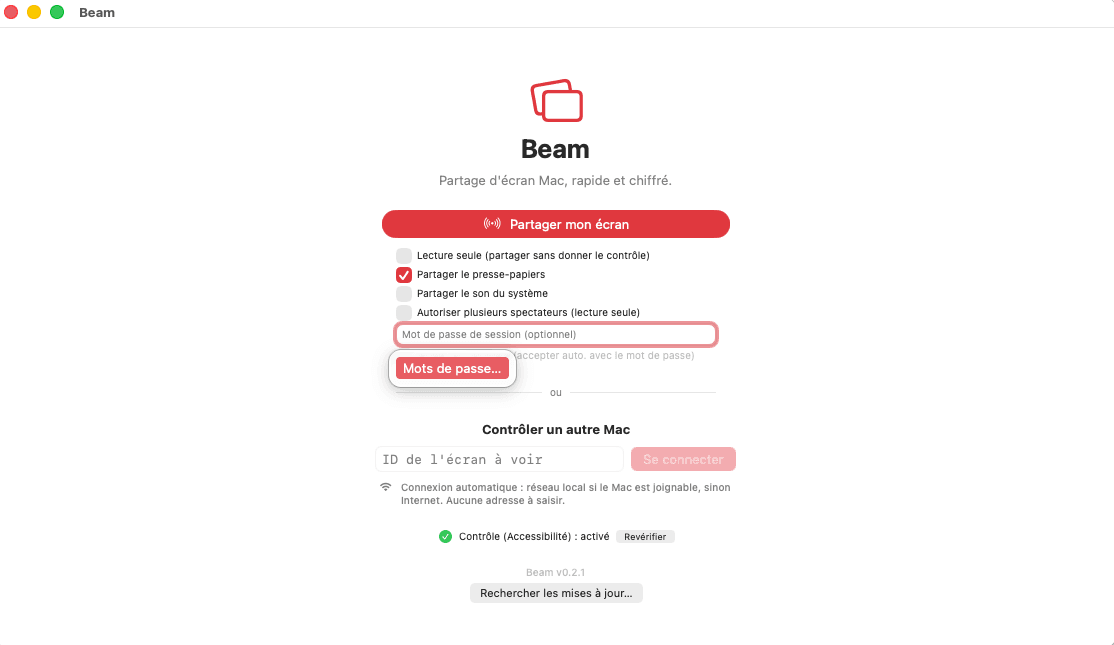
Mouse and keyboard: drive the other Mac as if you were sitting in front of it. View-only mode available.
End-to-end encrypted
Every frame and keystroke is encrypted (X25519 + AES-GCM). Neither the network nor the relay sees your screen in the clear.
LAN or Internet, automatic
Beam picks the path on its own: direct on the local network; over the Internet, the session starts through the relay, then switches to a direct link between the two Macs when the network allows it. No address to enter.
9-digit ID
Each Mac gets a 9-digit ID that it keeps from one session to the next: just read it out to connect.
Clipboard & files
Shared copy-paste in control mode, and drag-and-drop file transfer that the recipient accepts.
Audio & multi-display
Share system sound and pick which screen or window to broadcast.
Chat & recording
Chat during the session, record the screen you are viewing as a video (the other Mac is notified), and let several people watch in view-only mode.
Password & unattended access
Protect a session with a password and allow automatic access for your own machines.
One-click updates
Beam checks for a new version once a day and installs it in one click, with nothing to reinstall. You can turn the check off on its home screen.
Always the fastest connection, automatically
Nothing to configure. On every connection, Beam takes the fastest path the network allows.
Local network (LAN)
Two Macs on the same network find each other and connect directly: the session goes through no server, with near-zero latency.
Direct (P2P)
Over the Internet, the session starts through the relay, then Beam tries a direct peer-to-peer link to stop going through it whenever the network allows.
Relay (Internet)
If a direct link isn't possible, the session stays on the relay, still end-to-end encrypted: it works behind any router, anywhere.
Your sessions are never seen in the clear
Beam encrypts everything in the session end-to-end, with an X25519 key exchange and AES-GCM: the relay can neither see your screen nor replay your keystrokes. It only sees what it needs to connect the two Macs: their Beam IDs, their names and their IP addresses. A 16-character security code is compared on both sides, and the connecting Mac remembers the shared Mac's identity: if it changes, the connection is refused.
Privacy policy and terms of useGet started in 3 steps
Download and install
Open the .dmg file and drag Beam into your Applications folder.
Grant permissions
On the Mac that shares its screen, allow Screen Recording and Accessibility (required for remote control). macOS also asks both Macs for local network access and notifications.
Share or connect
Click "Share my screen", or enter the other Mac's 9-digit ID to control it.
Why Beam instead of TeamViewer or AnyDesk?
TeamViewer and AnyDesk cover every platform. Beam does one thing: connect two Macs, as simply as possible.
Built for the Mac, and only the Mac
Beam uses Apple's own frameworks to capture and compress the screen: up to 60 frames per second, hardware HEVC video encoding (H.264 on older Intel Macs) and a 3 MB download.
Free, no account, no time limit
No subscription, no sign-up, no session cut off after a set time. Install Beam, share your ID, and you're done.
No analytics, no ads
No account, no trackers. If the app crashes, the report stays on your Mac. The relay only keeps a technical log of connections, for about two weeks.
Security you can check yourself
End-to-end encryption, a security code to compare out loud, and the identity of the Mac you connect to remembered: if it changes, Beam refuses the connection.
Frequently asked questions
Is Beam really free?
Yes. No subscription, no account to create, no ads, and no maximum session length. You download the app, and that's it.
Does Beam work with Windows, an iPhone or an iPad?
No. Beam connects two Macs, and only Macs: both need macOS 14 Sonoma or later, on an Intel or Apple Silicon Mac. For a Windows PC or a tablet, you need another tool.
Do both Macs need to be on the same network?
No. On the same network, Beam connects the two Macs directly. Remotely, the session starts through its relay, then Beam tries a direct link between them, and stays on the relay if the network blocks it. The choice is automatic, at every connection.
Can the relay see my screen?
No. Everything in the session (video, audio, keyboard, mouse, clipboard, files, chat) is end-to-end encrypted with an X25519 key exchange and AES-GCM: the relay only forwards unreadable data. To connect the two Macs, it does know their Beam IDs, their names and their IP addresses. Its technical log records the IDs when Beam opens and closes and at each connection, with no IP address except when someone tries to take over an ID that is already online, and it is erased within about two weeks.
How can I check that nobody is intercepting the session?
Beam shows the same 16-character security code on both Macs: compare it out loud at the start of the session. Beam also remembers the identity of every Mac you connect to and refuses the connection if it changes. The code has been reviewed for security, but has not had an independent audit yet.
Can I connect to my Mac when nobody is in front of it?
Yes, with unattended access. It only works with a session password, which the person connecting must enter; after several wrong attempts, Beam blocks automatic acceptance for longer and longer. Keep this setting for your own machines.
Why does macOS ask for Screen Recording and Accessibility?
Screen Recording lets Beam capture the shared screen, and Accessibility lets it receive clicks and keystrokes from the other Mac: macOS only asks the Mac that shares its screen for them. Both Macs also ask for local network access, to find each other directly, and for notifications. You can revoke everything at any time in System Settings, under Privacy & Security.
Does Beam collect data about me?
Very little. Beam has no account, no usage analytics and no ads, and a crash report stays on your Mac. To work, it still exchanges some data: the relay knows the ID, name and IP address of each connected Mac; Google's and Cloudflare's STUN servers see the public IP address at the start of an Internet session; GitHub sees it when Beam checks for an update, once a day. The details are in its privacy policy.
What image quality can I expect?
Beam captures up to 60 frames per second and compresses the image with the Mac's hardware video encoder (HEVC, or H.264 on older Intel Macs). In automatic mode, resolution and bitrate adapt to the network continuously; you can also pick high, medium or low quality.
What languages is the app available in?
Beam is available in English and French, and follows your Mac's language.
Ready to try Beam?
Free download, no sign-up.
macOS 14+ · Intel & Apple Silicon · 3 MB